Find all the programs that start when Windows is loaded

AutoRuns can be used to view all the programs that load automatically on your PC during start-up.

Some programs such as anti-virus software, for example, are useful to load every time your PC starts. Others are less necessary. And if enough of them automatically load at once, it can substantially slow down your PC's start-up process.

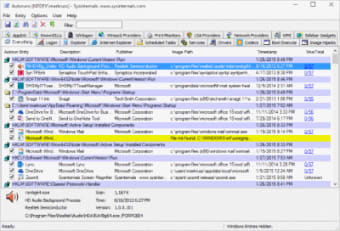
AutoRuns quickly scans your computer and provides a list of all programs that load every time you turn your computer on. You can filter the results on AutoRuns by a number of different categories. These include print monitors, network providers, and scheduled tasks, among others. You can also just simply view everything at once.

Click on an individual program and AutoRuns will provide further information on it in a panel below the full list. The size of the program is one of the most important things to note, as it will help you determine if that particular program should not be loaded upon start-up for the best results. From there AutoRuns lets you opt to prevent certain programs from loading on start-up.

Unfortunately, AutoRuns' help file didn't work during our test, so if you have questions about how to use the program, you'll be out of luck without a further internet search.

AutoRuns provides an easy way to see what programs load during your PC's start-up.
  • Pros

    • Many ways to filter your results
    • Additional program information is provided with one click
  • Cons

    • Help file does not open
 0/1

App specs

Program available in other languages


Icon of program: AutoRuns

AutoRuns for PC

  • Free
  • 3.9
    195
  • 111.4K
  • V14.11

User reviews about AutoRuns

3.9

1 reviews

Add review

Main reviews for you

  • Anonymous user

    Basic but practical utility. Here is a tool that might double your startup time in a flash. If you don't take much notice of installation processes, then the chances are that you have a long list of un-used programs loading in to memory once Windows starts up. With AutoRuns, you can see what they are and do something about it. There are others ways to access the list, for example through the registry but this software give you a little more security that you won't bring you computer to its knees with no way back. Pros: SimplePractical Cons: Not actually necessary, since you can do the exact same thing if you know where to look in the registry.


More

You may also like

Alternatives to AutoRuns

Explore Apps

Latest articles

Laws concerning the use of this software vary from country to country. We do not encourage or condone the use of this program if it is in violation of these laws.
Softonic

Is AutoRuns safe?

99/100

Score result: Clean

This file passed a comprehensive security scan using VirusTotal technology. It is safe to download.

  • Virus free
  • Spyware free
  • Malware free
  • Verified by Security Partners

    VirusTotal logo

Scan Info

Last scan
Friday, October 25, 2024
Scan provider
VirusTotal · Full report

File Integrity

File
Autoruns.zip
SHA256
b04d2ac6dcc287a4b01a9cdc5bd9580a38df8a3379e03698cf7b888cdab7ea0f
SHA1
130a744a421ca914f2809685af8262c468f4177a

Softonic security commitment

AutoRuns has been thoroughly scanned by our advanced security systems and verified by industry-leading partners. This file comes from the official developer and has passed all our security checks, showing no signs of viruses, malware, or spyware. For more information, visit our Security and Trust Center